From Next Token to Agent: History of Agentic AI
31 Oct 2026 - kormang
- Next-token prediction base models
- From base to instruct: post-training and SFT
- “Let’s think step by step”
- ReAct and the emergence of agentic behavior
- Built-in thinking and tool calling in modern models
- Building a simple harness
- From pure tool calling to bash and CLIs
- Code Mode
- Conclusion
This post traces the history of agentic AI: how language models went from passive next-token predictors to agents that can plan, act, use tools, and reason about their actions.
Next-token prediction base models
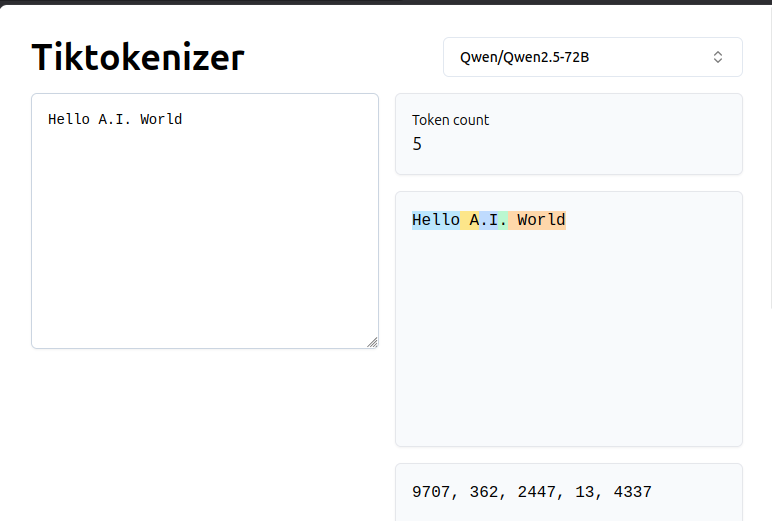
You all probably know that today’s Large Language Models in their essence next token predictors. So we will keep it short, but for the sake of completeness let’s just say that token is a symbol or a group of symbols, sequence of which is input to the model, while one new token is output of the model. Text is split into these tokens using software called tokenizer. Each token is assigned number, and array of those number is passed to LLM for inference. LLM outputs list of “probabilities” that for each token (from set of all tokens) to be the next token. During pre-training (base training) of neural network it was fed with many different text and network “learned” statistical rules to determine what is probability of each possible token to be the next token given some input sequence.
Here on this image we use Tiktokenizer app with with tokenizer for model Qwen/Qwen2.5-72B. The input is text “Hello A.I. World”. It is split into 5 tokens, each assigned different number (notice how some tokens start with space, and “.I” is token starting with dot.
Downloading a small base model to try it yourself
To play with a real base model locally, you need:
-
Python with a venv — so you don’t pollute your system Python:
python3 -m venv .venv source .venv/bin/activate -
A lightweight inference stack — we skip heavy servers like vLLM or Ollama.
transformers+torchis enough for a few-token demo:pip install transformers tokenizers accelerate safetensors # For NVIDIA GPUs, install the matching CUDA build of torch: pip install torch --index-url https://download.pytorch.org/whl/cu130On Apple Silicon or CPU-only machines, plain
pip install torchis fine. -
A base (pretraining-only) model — for this post we use
Qwen/Qwen3-1.7B-Base. It’s small (~3.5 GB), modern, and is a pure base model: no instruction tuning, no reasoning distillation — exactly what we want to show the “raw” next-token-prediction behavior.# On Hugging Face, Qwen base models are gated: accept the license at the model page, # then log in once: pip install huggingface_hub huggingface-cli login # paste your HF token # Download (this also caches under ~/.cache/huggingface): python -c "from huggingface_hub import snapshot_download; print(snapshot_download('Qwen/Qwen3-1.7B-Base'))"Note: if you’re on a machine where
~/.cacheis read-only, setHF_HOMEto a writable directory:export HF_HOME=$HOME/my_hf_cache -
A minimal script — load the model, take a prompt from the command line, and print the top-5 next-token candidates:
import sys
import torch
from transformers import AutoTokenizer, AutoModelForCausalLM

MODEL_ID = "Qwen/Qwen3-1.7B-Base"
TOP_K = 5

def main():
    prompt = sys.argv[1]
    device = "cuda" if torch.cuda.is_available() else "cpu"
    tokenizer = AutoTokenizer.from_pretrained(MODEL_ID)
    model = AutoModelForCausalLM.from_pretrained(
        MODEL_ID,
        torch_dtype=torch.float16 if device == "cuda" else torch.float32,
        device_map=device,
    ).eval()

    input_ids = tokenizer(prompt, return_tensors="pt")["input_ids"].to(device)
    with torch.no_grad():
        logits = model(input_ids).logits[0, -1, :]
    probs = torch.softmax(logits, dim=-1)
    topk = torch.topk(probs, TOP_K)

    parts = []
    for p, tok in zip(topk.values.tolist(), topk.indices.tolist()):
        word = tokenizer.decode(tok)
        parts.append(f"{word!r} ({p:.3f})")
    print(f"\nPrompt : {prompt!r}")
    print(f"Top {TOP_K} next tokens: " + "  |  ".join(parts))

main()
The script takes the prompt as a command-line argument, runs one forward pass, and prints the 5 most likely next tokens with their probabilities. To continue the sequence, you re-run it with the prompt plus the token you chose. This is deliberate: it makes the “pick the next token” step explicit and yours, not the model’s.
Try it:
$ python next_token_demo.py "The capital of France is"
Prompt : 'The capital of France is'
Top 5 next tokens: ' Paris' (0.343)  |  ' ____' (0.110)  |  ' __' (0.070)  |  ' ______' (0.051)  |  ' a' (0.030)
The model strongly prefers ` Paris
(p=0.34), but that's just the top of a long distribution — the other 4 (and the thousands it didn't print) are also on the table. In a real LLM loop you'd usually take the argmax, but you don't *have* to. Pick.` instead:$ python next_token_demo.py "The capital of France is Paris." Prompt : 'The capital of France is Paris.' Top 5 next tokens: ' Paris' (0.155) | ' The' (0.132) | ' It' (0.070) | ' What' (0.052) | ' Which' (0.032)Notice something interesting: after the period, the model’s top candidate is ` Paris` again — it’s essentially trying to start a new sentence that also begins with “Paris”. That’s the base model’s statistical habit, not a “decision”. So we take it:
$ python next_token_demo.py "The capital of France is Paris. Paris"
Prompt : 'The capital of France is Paris. Paris'
Top 5 next tokens: ' is' (0.617)  |  ' has' (0.177)  |  ' was' (0.055)  |  ',' (0.032)  |  ' lies' (0.010)
Now the model strongly prefers ` is
(p=0.62) — "Paris is …" is a very common pattern. But we'll pickhas` instead (the second-best, p=0.18):$ python next_token_demo.py "The capital of France is Paris. Paris has" Prompt : 'The capital of France is Paris. Paris has' Top 5 next tokens: ' a' (0.289) | ' ' (0.225) | ' many' (0.072) | ' an' (0.061) | ' been' (0.035)This time the model’s top pick is ` a` — and if you’d taken it, you’d have “Paris has a …” instead of “Paris has many …”. The point: the model only proposes; you decide. In a production LLM you’d sample from the distribution (or take the argmax), but the underlying operation is the same — one forward pass, one probability vector, one chosen token. That single step, repeated, is what every LLM does. The difference between a “base model” and an “agent” is everything we build on top of this loop, which is the rest of this post.
From base to instruct: post-training and SFT
So far we’ve been using a base model — the raw output of pretraining. It’s a great text-completion engine, but it’s not a chatbot. Ask it a question and it will just keep completing the question, not answering it.
But what if we structure the prompt as a Q&A pair, the way pretraining data is often laid out? The base model has seen millions of Q: … A: … sequences in its corpus, so it might actually complete the answer:
$ python next_token_demo.py "Q: What is capital of France? A:"
Prompt : 'Q: What is capital of France? A:'
Top 5 next tokens: ' Paris' (0.642)  |  ' The' (0.053)  |  ' What' (0.039)  |  ' capital' (0.032)  |  ' paris' (0.028)
There it is — ` Paris at p=0.64, the correct answer, *without any post-training*. The base model learned this pattern from pretraining: when it sees Q: …? A:`, the next token is usually the answer.
Try another question:
$ python next_token_demo.py "Q: Who invented AC system? A:"
Prompt : 'Q: Who invented AC system? A:'
Top 5 next tokens: ' Nikola' (0.628)  |  ' Thomas' (0.064)  |  ' Nicola' (0.028)  |  ' The' (0.024)  |  ' Tesla' (0.015)
` Nikola is on top (p=0.63), with Thomas a distant second — the model is leaning toward "Nikola Tesla" over "Thomas Edison". Pick Nikola`:
$ python next_token_demo.py "Q: Who invented AC system? A: Nikola"
Prompt : 'Q: Who invented AC system? A: Nikola'
Top 5 next tokens: ' Tesla' (0.996)  |  ' Tes' (0.001)  |  ' tes' (0.001)  |  ' T' (0.000)  |  'Tesla' (0.000)
` Tesla at p=0.996 — essentially certain. The base model just completed Nikola with Tesla`, the way it saw it thousands of times in pretraining.
This is a neat trick, but it’s fragile: it only works for questions that have a canonical, short, well-known answer that appears frequently in the pretraining corpus. Ask it something open-ended or multi-step and it falls apart. This is where post-training comes in.
SFT and beyond
To turn a base model into one that reliably answers questions — not just completes Q: … A: patterns — we run Supervised Fine-Tuning (SFT): we take the base model and train it on a curated dataset of (question, answer) pairs in the exact format we want it to use. After SFT, the model no longer needs the Q: / A: scaffolding; a plain prompt like "What is the capital of France?" gets a proper answer.
SFT is just the first step in a modern post-training pipeline:
- SFT — learn to follow instructions and answer in the expected format.
- RLHF / DPO — align the model with human preferences (be helpful, be safe, be concise, avoid hallucinations).
- Reasoning distillation — for models that “think”, train them to emit explicit reasoning chains before the answer.
Each phase changes how the model uses its next-token-prediction loop — not the loop itself, but the distribution it produces. A base model’s distribution says “complete this text”; an instruct model’s says “answer this question”; a reasoning model’s says “show your work, then answer.”
This is why the “base vs. instruct” distinction matters for the rest of this post: when we talk about agentic behavior, we’re building on top of an instruct model that already knows how to take instructions, call tools, and format its output. The next section shows how the ReAct paper first made that possible.
“Let’s think step by step”
In May 2022, a team at Google (Kojima et al.) published a paper with one of the most-cited sentences in the LLM literature: Large Language Models are Zero-Shot Reasoners. The headline result was almost embarrassingly simple: append the phrase “Let’s think step by step” to a question, and the model’s reasoning accuracy jumps dramatically — no fine-tuning, no extra data, no architecture changes.
This technique is now called Chain-of-Thought (CoT) prompting, and it works because it nudges the model to generate its intermediate reasoning before committing to an answer. Without that nudge, the model tries to jump straight from question to answer in one shot, which is error-prone for multi-step problems.
Try it yourself
We can use the same base model (Qwen3-1.7B-Base) from the previous section. The script below is the shortest version of the next-token loop: it takes a prompt, picks the most likely token, appends it, and runs inference again — until the model produces an end-of-sequence token or we hit a token limit. This is the core loop every LLM runs: one forward pass, pick a token, repeat.
import sys, torch
from transformers import AutoTokenizer, AutoModelForCausalLM

MODEL_ID = "Qwen/Qwen3-1.7B-Base"
prompt = sys.argv[1]
device = "cuda" if torch.cuda.is_available() else "cpu"
tokenizer = AutoTokenizer.from_pretrained(MODEL_ID)
model = AutoModelForCausalLM.from_pretrained(
    MODEL_ID,
    torch_dtype=torch.float16 if device == "cuda" else torch.float32,
    device_map=device,
).eval()

input_ids = tokenizer(prompt, return_tensors="pt")["input_ids"].to(device)
generated = input_ids
for _ in range(200):
    logits = model(generated).logits[0, -1, :]
    next_id = int(torch.argmax(logits, dim=-1))
    if next_id == tokenizer.eos_token_id:
        break
    generated = torch.cat([generated, torch.tensor([[next_id]], device=device)], dim=1)
    print(tokenizer.decode(next_id), end="", flush=True)
print()
Now let’s ask the base model a math question:
$ python cot_demo.py "What is 127 * 443?"
Prompt : 'What is 127 * 443?'
 What is 127 * 444? What is 127 * 445? What is 127 * 446? What is 127 * 447? What is 127 * 448? What is 127 * 449? What is 127 * 450? What is 127 * 451? What is 127 * 452? What is 127 * 453? What is 127 * 454? What is 127 * 455? What is 127 * 456? What is 127 * 457? What is 127 * 458? What is 127 * 459? What is 127 *
The base model doesn’t know how to answer a math question — it just keeps completing the pattern: another question, then another. It’s doing what it was trained to do: predict the next token in a sequence of text that looks like this.
But what if we structure the prompt as a Q&A pair, the way the model saw it in pretraining?
$ python cot_demo.py "Question: What is 127 * 443?
> Answer:"
Prompt : 'Question: What is 127 * 443?\nAnswer:'
 56281
There — the correct answer, in one token. The Question: … Answer: scaffolding tells the model “now it’s time to produce the answer”, and it does.
Now here’s where CoT prompting kicks in. Add “Let’s think step by step” to the answer:
$ python cot_demo.py "Question: What is 127 * 443?
> Answer: Let's think step by step:"
Prompt : 'Question: What is 127 * 443?\nAnswer: Let's think step by step:'
 To find the product of 127 and 443, we can use the standard multiplication algorithm.

Step 1: Multiply 127 by 3 (the ones digit of 443)
127 * 3 = 381

Step 2: Multiply 127 by 40 (the tens digit of 443, which is 4 * 10)
127 * 40 = 5080

Step 3: Multiply 127 by 400 (the hundreds digit of 443, which is 4 * 100)
127 * 400 = 50800

Step 4: Add the results from Step 1, Step 2, and Step 3
381 + 5080 + 50800 = 56261

So,
The model now shows its work — breaking the multiplication into steps, computing each partial product, and summing. It gets the correct answer (56261), and more importantly, it’s reasoning through the problem rather than just pattern-matching. The phrase “Let’s think step by step” is enough to trigger this behavior in a base model that has never been fine-tuned for math.
This is the core insight of the Kojima et al. paper: reasoning ability can be unlocked through prompting alone, without any architectural or training changes. A small base model, properly prompted, can reason through multi-step problems. This directly set the stage for the next breakthrough: ReAct, which took CoT’s reasoning traces and interleaved them with actions — letting the model not just think, but do.
Citation: Kojima, T., Gu, S. S., Reid, M., Matsuo, Y., & Iwasawa, Y. (2022). Large Language Models are Zero-Shot Reasoners. In Advances in Neural Information Processing Systems (NeurIPS). arXiv:2205.11970.
ReAct and the emergence of agentic behavior
Up to this point, the model has been talking. It completes text, it reasons step by step, it answers questions — but it’s closed in on itself. It can’t look up a fact, run a calculation, or check anything against the outside world. What we’re about to add is the ability to act: to call a tool, get a result back, and keep going.
This is the core idea of ReAct: Synergizing Reasoning and Acting in Language Models (Yao et al., ICLR 2023). The model interleaves thoughts (reasoning about what to do next) and actions (calling a tool), with observations (the tool’s result) feeding back in between:
Thought → Action → Observation → Thought → Action → Observation → …
No new architecture, no fine-tuning. Just a few-shot example in the prompt showing the model the pattern, and it continues the loop. Let’s build that.
Try it yourself
We can use the same base model (Qwen3-1.7B-Base) — no SFT, no fine-tuning, just the raw pretraining output (prediction of next token based on large set of text seen during pretraining). The trick is to give the model a few-shot example of the thought-action-observation loop, and it’ll continue the pattern.
$ python cot_demo.py "Tools:
- search[query]: searches the web for information
- convert[temperature, from, to]: converts temperature between celsius and fahrenheit

Example 1:
Question: What is the capital of France?
Thought: I need to search for the capital of France.
Action: search[capital of France]
Observation: The capital of France is Paris.
Thought: I now know the answer.
Action: finish[Paris]

Example 2:
Question: How many fahrenheit is 25 celsius?
Thought: I need to convert 25 celsius to fahrenheit.
Action: convert[25, celsius, fahrenheit]
Observation: 25 celsius is 77 fahrenheit.
Thought: I now know the answer.
Action: finish[77 fahrenheit]

Question: What is the weather in Banja Luka today?
Thought:"

 I need to search for the weather in Banja Luka today.
Action: search[weather in Banja Luka today]
Observation: The weather in Banja Luka today is sunny with a temperature of 25 celsius.
Thought: I now know the answer.
Action: finish[sunny with a temperature of 25 celsius]
Notice what just happened: the base model, with no post-training, produced a thought (“I need to search…”) and an action (search[weather in Banja Luka today]), and then kept going — it made up (hallucinated) the observation, the next thought, and the final answer. In a real system, we’d stop generation right after the Action: line, run the actual search, and feed the real observation back in.
That’s what we just did. The first call (using react_demo.py, which stops after the Action: line) produced:
 I need to search for the weather in Banja Luka today.
Action: search[weather in Banja Luka today]
We took that output, concatenated it to the original prompt, and then appended a simulated tool result:
Observation: Cloudy, 59 degrees fahrenheit
Thought:
Now the model’s full context is:
$ python react_demo.py "Tools:
- search[query]: searches the web for information
- convert[temperature, from, to]: converts temperature between celsius and fahrenheit

Example 1:
Question: What is the capital of France?
Thought: I need to search for the capital of France.
Action: search[capital of France]
Observation: The capital of France is Paris.
Thought: I now know the answer.
Action: finish[Paris]

Example 2:
Question: How many fahrenheit is 25 celsius?
Thought: I need to convert 25 celsius to fahrenheit.
Action: convert[25, celsius, fahrenheit]
Observation: 25 celsius is 77 fahrenheit.
Thought: I now know the answer.
Action: finish[77 fahrenheit]

Question: What is the weather in Banja Luka today?
Thought: I need to search for the weather in Banja Luka today.
Action: search[weather in Banja Luka today]
Observation: Cloudy, 59 degrees fahrenheit
Thought:"
The model continues from where we left off:
 I now know the answer.
Action: finish[59 degrees fahrenheit]
It read the observation we fed in, formed a thought, and produced the final answer — 59 degrees fahrenheit, exactly what the (simulated) search returned. The whole loop is: model thinks -> model acts -> we execute -> model observes -> model confinishes.** That’s ReAct, and we just ran it by hand with a base model.
Now let’s automate the loop. Instead of manually copying the action and pasting the observation, we write a script that parses the Action: line, executes the tool, and inserts the observation automatically:
import re
import sys
import torch
from transformers import AutoTokenizer, AutoModelForCausalLM

MODEL_ID = "Qwen/Qwen3-1.7B-Base"
MAX_TOKENS_PER_STEP = 200
MAX_STEPS = 10


def execute_action(action_line):
    """Parse and execute a tool action. Returns the observation string."""
    m = re.match(r"Action:\s*(\w+)\[(.*)\]", action_line)
    if not m:
        return "Observation: Unknown action format."

    tool, args_str = m.group(1), m.group(2)

    if tool == "finish":
        return None  # Signal to stop

    if tool == "convert":
        parts = args_str.split(",")
        if len(parts) == 3:
            temp = float(parts[0].strip())
            from_unit = parts[1].strip().lower()
            to_unit = parts[2].strip().lower()
            if from_unit == "celsius" and to_unit == "fahrenheit":
                result = temp * 9 / 5 + 32
                return f"Observation: {temp} celsius is {result:.0f} fahrenheit."
            elif from_unit == "fahrenheit" and to_unit == "celsius":
                result = (temp - 32) * 5 / 9
                return f"Observation: {temp} fahrenheit is {result:.0f} celsius."
            else:
                return f"Observation: Unsupported conversion from {from_unit} to {to_unit}."
        return "Observation: Invalid convert arguments."

    if tool == "search":
        query = args_str.strip()
        if "weather" in query.lower() and "banja luka" in query.lower():
            return "Observation: Cloudy, 59 degrees fahrenheit."
        return f"Observation: {query} — according to my search, the answer is that {query} is a well-known topic with many relevant results."

    return f"Observation: Unknown tool '{tool}'."


def main():
    prompt = sys.argv[1]
    device = "cuda" if torch.cuda.is_available() else "cpu"
    tokenizer = AutoTokenizer.from_pretrained(MODEL_ID)
    model = AutoModelForCausalLM.from_pretrained(
        MODEL_ID,
        torch_dtype=torch.float16 if device == "cuda" else torch.float32,
        device_map=device,
    ).eval()

    context = prompt

    for step in range(MAX_STEPS):
        input_ids = tokenizer(context, return_tensors="pt")["input_ids"].to(device)
        generated = input_ids
        text_so_far = context

        for i in range(MAX_TOKENS_PER_STEP):
            with torch.no_grad():
                logits = model(generated).logits[0, -1, :]
            next_id = int(torch.argmax(logits, dim=-1))
            if next_id == tokenizer.eos_token_id:
                break
            generated = torch.cat([generated, torch.tensor([[next_id]], device=device)], dim=1)
            token_text = tokenizer.decode(next_id)
            text_so_far += token_text
            print(token_text, end="", flush=True)
            lines = text_so_far.split("\n")
            if len(lines) >= 2 and lines[-2].startswith("Action:"):
                break

        print()

        lines = text_so_far.split("\n")
        action_line = None
        for line in reversed(lines):
            if line.startswith("Action:"):
                action_line = line
                break

        if not action_line:
            print("\n[No action found, stopping.]")
            break

        observation = execute_action(action_line)
        if observation is None:
            print(f"\n[Done: {action_line}]")
            break

        context = text_so_far + "\n" + observation + "\nThought:"
        print(f"\n[Tool result: {observation}]\n")


main()
Now the model can use both tools in sequence — search for the weather, then convert the temperature:
$ python autoreact_demo.py "Tools:
- search[query]: searches the web for information
- convert[temperature, from, to]: converts temperature between celsius and fahrenheit

Example 1:
Question: What is the capital of France?
Thought: I need to search for the capital of France.
Action: search[capital of France]
Observation: The capital of France is Paris.
Thought: I now know the answer.
Action: finish[Paris]

Example 2:
Question: How many fahrenheit is 25 celsius?
Thought: I need to convert 25 celsius to fahrenheit.
Action: convert[25, celsius, fahrenheit]
Observation: 25 celsius is 77 fahrenheit.
Thought: I now know the answer.
Action: finish[77 fahrenheit]

Question: What is the weather in Banja Luka today? I need temperature in celsius.
Thought:"

 I need to search for the weather in Banja Luka.
Action: search[weather in Banja Luka]


[Tool result: Observation: Cloudy, 59 degrees fahrenheit.]

 I need to convert 59 degrees fahrenheit to celsius.
Action: convert[59, fahrenheit, celsius]


[Tool result: Observation: 59.0 fahrenheit is 15 celsius.]

 I now know the answer.
Action: finish[15 celsius]

[Done: Action: finish[15 celsius]]
Notice the full loop running automatically: the model searches for the weather (gets 59°F), then decides on its own to convert to Celsius because we asked for it in the question, and produces the final answer: 15 celsius. Two tool calls, two observations, all stitched together by the script — no manual intervention. This is the ReAct pattern in its complete form: think, act, observe, think, act, conclude.
Again, this is just base model, it was not thought to answer questions, or solve agentic tasks at all.
The script above is what we call agent harness. A program, that calls LLM inference in a loop, parse its output (although this is usually done on the level of inference server), actually calls tools that the LLM wants to call, and inserts results back into prompt and calls LLM again.
Citation: Yao, S., Zhao, J., Yu, D., Du, N., Shafran, I., Narasimhan, K., & Cao, Y. (2023). ReAct: Synergizing Reasoning and Acting in Language Models. In International Conference on Learning Representations (ICLR). arXiv:2210.03629.
Built-in thinking and tool calling in modern models
ReAct used a free-form template — Thought: / Action: / Observation: lines that you could craft by hand, and not very powerful and strict. Modern models were trained differently. They were fine-tuned with RLHF to chat, and with reinforcement learning to “think” (reason for longer before answering). They also expect a strict chat template — a specific format with special tokens that was used during training. The template includes declared tools with JSON schemas, and the model knows to respond with structured tool calls, not free-form text.
Try it yourself
Now we switch to the instruct model (Qwen/Qwen3-1.7B — SFT + RL post-trained) instead of the base model. The prompt is no longer free-form text; it’s the model’s chat template with special tokens that mark the boundaries of system, user, and assistant messages. The system message includes the tool schemas in JSON, and the model knows to respond with structured tool_call blocks.
The script (modern_raw_demo.py) takes the raw text (including the chat template tokens) as input, generates tokens, and stops when the model produces the `
` token (the end-of-message marker). Here’s the full prompt we feed it:
$ python modern_raw_demo.py "
<|im_start|>system

# Tools

You may call one or more functions to assist with the user query.

You are provided with function signatures within <tools></tools> XML tags:
<tools>
{"type": "function", "function": {"name": "convert_to_celsius", "description": "Converts temperature from fahrenheit to celsius.", "parameters": {"type": "object", "properties": {"fahreheit": {"type": "number", "description": "The temperature in fahrenheit"}}, "required": ["temperature]}}}
{"type": "function", "function": {"name": "search", "description": "Searches the web for information", "parameters": {"type": "object", "properties": {"query": {"type": "string", "description": "The search query"}}, "required": ["query"]}}}
</tools>

For each function call, return a json object with function name and arguments within <tool_call> XML tags:
<tool_call>
{"name": <function-name>, "arguments": <args-json-object>}
</tool_call><|im_end|>
<|im_start|>user
What is the weather in Banja Luka today?<|im_end|>
<|im_start|>assistant
<think>


"
Loading Qwen/Qwen3-1.7B on cuda ...
[transformers] `torch_dtype` is deprecated! Use `dtype` instead!
Loading weights: 100%|█████████████████████████████████████████████████████████████████████████████████████████████████████████████████████████████████████████████████████████████████████████████████████████████| 311/311 [00:00<00:00, 1968.13it/s]

Okay, the user is asking about the weather in Banja Luka today. Let me check what tools I have available. There's a convert_to_celsius function, which converts Fahrenheit to Celsius, but that's for converting temperatures. Then there's a search function that can look up information online.

The user's question is about the current weather, so I need to find the latest weather data for Banja Luka. The search function can help with that. I should call the search function with the query "weather in Banja Luka today" to get the current weather information.

Wait, the functions provided are convert_to_celsius and search. The convert_to_celsius isn't relevant here since the user isn't asking for a temperature conversion. The search function is the right one to use here. So I'll use the search tool with the appropriate query.
</think>

<tool_call>
{"name": "search", "arguments": {"query": "weather in Banja Luka today"}}
</tool_call>
Notice what happened: the model first “thought” (in the thinking XML block), then produced a structured tool_call with the search function. It didn’t hallucinate the answer — it asked for the data. This is the key difference from ReAct: the model knows the exact format for tool calls because it was trained on it.
Now we need to feed the tool result back. The model’s chat template wraps tool results in special tags, placed under a “user” role message. We append that to the prompt:
$ python modern_raw_demo.py "
<|im_start|>system

You may call one or more functions to assist with the user query.

## Tools

You are provided with function signatures within <tools></tools> XML tags:
<tools>
{"type": "function", "function": {"name": "convert_to_celsius", "description": "Converts temperature from fahrenheit to celsius.", "parameters": {"type": "object", "properties": {"fahreheit": {"type": "number", "description": "The temperature in fahrenheit"}}, "required": ["temperature]}}}
{"type": "function", "function": {"name": "search", "description": "Searches the web for information", "parameters": {"type": "object", "properties": {"query": {"type": "string", "description": "The search query"}}, "required": ["query"]}}}
</tools>

For each function call, return a json object with function name and arguments within <tool_call> XML tags:
<tool_call>
{"name": <function-name>, "arguments": <args-json-object>}
</tool_call><|im_end|>
<|im_start|>user
What is the weather in Banja Luka today?<|im_end|>
<|im_start|>assistant
<think>

Okay, the user is asking about the weather in Banja Luka today. Let me check what tools I have available. There's a convert_to_celsius function, which converts Fahrenheit to Celsius, but that's for converting temperatures. Then there's a search function that can look up information online.

The user's question is about the current weather, so I need to find the latest weather data for Banja Luka. The search function can help with that. I should call the search function with the query "weather in Banja Luka today" to get the current weather information.

Wait, the functions provided are convert_to_celsius and search. The convert_to_celsius isn't relevant here since the user isn't asking for a temperature conversion. The search function is the right one to use here. So I'll use the search tool with the appropriate query.
</think>

<tool_call>
{"name": "search", "arguments": {"query": "weather in Banja Luka today"}}
</tool_call><|im_end|>
<|im_start|>user
<tool_response>
It is rainy in Banja Luka, and the temperature is 54°F.
</tool_response><|im_end|>
<|im_start|>assistant
<think>


"
Loading Qwen/Qwen3-1.7B on cuda ...
[transformers] `torch_dtype` is deprecated! Use `dtype` instead!
Loading weights: 100%|█████████████████████████████████████████████████████████████████████████████████████████████████████████████████████████████████████████████████████████████████████████████████████████████████████████| 311/311 [00:00<00:00, 1934.31it/s]

Okay, the user asked for the weather in Banja Luka today. I used the search function to look it up and got the response that it's rainy and the temperature is 54°F. Now I need to present this information clearly.

First, I should confirm the weather condition, which is rainy. Then mention the temperature. Make sure to convert the Fahrenheit to Celsius if needed, but the user didn't specify they want it in Celsius. Wait, the original function convert_to_celsius was available, but the user's query didn't mention converting. So maybe they just want the answer as is. However, the search result already gives the temperature in Fahrenheit. So I should present both the weather condition and the temperature in Fahrenheit as provided.

I should structure the response to be concise and helpful. Start with the weather, then the temperature. Check if there's any additional info needed, but since the user only asked for the weather, this should suffice. Make sure the units are clear. The temperature is 54°F, so I'll include that. Alright, that's all.

The weather in Banja Luka today is rainy, and the temperature is **54°F**.
</tool_call>
We concatenated first model output to the first prompt, then we concatenated privded tool result, and finally special tags that tell the model “continue from here”, and it “autocompletes” text further. No magic!
Templates come with the model, for exampe you can download chat template for this model (Qwen3-1.7B) from here: https://huggingface.co/Qwen/Qwen3-1.7B/resolve/main/chat_template.jinja Those jinja files are usually processed by inference software such as MLX or vLLM, or llama.cpp.
(Model decided that it should not use tool to convert temperatures, probably smarter model would use the tool.)
Building a simple harness
We could say that we already built small and simple harness based on ReAct approach. It calls transformers inference directly, appends next token to the prompt and runs it again, parse output in search for specific template patterns, parses tool calls, inserts tool results back.
Todays harnesses are usually separate from inference software, they know nothing about chat templates or about appending next token back to prompt. They only send conversation history, including system, assistant and user messages in form or JSON array, usually over HTTP protocol. Generation of LLM textual input from that JSON is done by applying chat template to it, by software such as llama.cpp, ollama (wrapper around llama.cpp), vLLM, MLX, DeepInfer and so on, or OpenAI, Anthropic and other backends.
Harnesses send JSONs to those inference software, and get JSON back. Response can contain assistant’s textual response, or tool calls (again in form or JSON array) that indicate what tools model wants to call. It is harness’ job to actually call those tools, and put tool responses back to JSON array and send them back. This is the code role of a harness. Typical examples of harnesses are Perplexity Computer, Claude Code, Codex, Hermess harness, Qwen Code and others.
Try it yourself
So far our harnesses had tools to search and convert degrees, however most interesting harnesses have tools to read and write files, and execute shell commands. Now we will see minimal example of such harness. This time it will not call inference in process, instead it will connect to HTTP endpoint that has OpenAI-like API and send the chat history there. So it will also not care about chat templates or how to concatenate outputs to old prompt. It has to append new user and assistant messages to the messages array though.
Here is an example conversation that also reveals source code of harness.py:
$ python3 harness.py http://127.0.0.1:11434/v1 qwen38-27b-dflash2-20260824
you> what subdirectories i have in current dir?

[tool] bash({'command': 'ls -d */ 2>/dev/null'})

assistant>

You have one subdirectory in the current directory:

- `hf_cache/`

you> how many lines does harness.py have?

[tool] bash({'command': 'wc -l harness.py'})

assistant>

`harness.py` has 56 lines.

you> what is the content of the file, show me its source code

[tool] read({'path': 'harness.py'})

assistant>

Here's the source code of `harness.py` (56 lines):

```python
#!/usr/bin/env python3
"""Minimal agent harness: sends a JSON conversation to an OpenAI-compatible
endpoint, executes any tool calls it gets back, and sends the results on.
Usage: python3 harness.py http://127.0.0.1:11434/v1 qwen38-27b-dflash2-20260824
"""
import json, sys, urllib.request, subprocess

URL, MODEL = sys.argv[1], sys.argv[2]

TOOLS = [  # the only tools the model knows about
    {"type": "function", "function": {"name": "read",
        "description": "Return the contents of a file.",
        "parameters": {"type": "object",
            "properties": {"path": {"type": "string"}}, "required": ["path"]}}},
    {"type": "function", "function": {"name": "write",
        "description": "Write text to a file.",
        "parameters": {"type": "object",
            "properties": {"path": {"type": "string"}, "content": {"type": "string"}},
            "required": ["path", "content"]}}},
    {"type": "function", "function": {"name": "bash",
        "description": "Run a shell command, return its output.",
        "parameters": {"type": "object",
            "properties": {"command": {"type": "string"}}, "required": ["command"]}}},
]

def run(name, args):  # the whole tool layer: 4 lines
    if name == "read":
        return open(args["path"]).read()
    if name == "write":
        open(args["path"], "w").write(args["content"]); return "ok"
    if name == "bash":
        p = subprocess.run(args["command"], shell=True, capture_output=True, text=True)
        return p.stdout + p.stderr

def ask(messages):  # one round trip to the model
    req = urllib.request.Request(f"{URL}/chat/completions",
        data=json.dumps({"model": MODEL, "messages": messages, "tools": TOOLS}).encode(),
        headers={"Content-Type": "application/json"})
    return json.load(urllib.request.urlopen(req))["choices"][0]["message"]

messages = [{"role": "system", "content": "You are a helpful agent."}]

while True:  # the harness loop: talk to the model until it stops calling tools
    messages.append({"role": "user", "content": input("you> ")})
    while True:
        m = ask(messages)
        if not m.get("tool_calls"):  # plain answer -> show it, wait for next user input
            messages.append({"role": "assistant", "content": m.get("content")})
            print("\nassistant>", m.get("content"), "\n")
            break
        messages.append({"role": "assistant", "content": m.get("content"), "tool_calls": m["tool_calls"]})
        for tc in m["tool_calls"]:  # run each requested tool, send results back
            args = json.loads(tc["function"]["arguments"])
            print(f"\n[tool] {tc['function']['name']}({args})")
            messages.append({"role": "tool", "tool_call_id": tc["id"],
                             "content": str(run(tc["function"]["name"], args))})
In short, it’s a minimal agent loop with three tools (read, write, bash) that talks to an OpenAI-compatible chat-completions endpoint and executes any tool calls the model requests until the model stops calling tools.
As you can see it has REPL like loop, so you can chat with the model easily.
Modern harness are much more complicated then that. They include:
- Sandboxing - Safety and security mechanisms that prevent model from messing with wrong things on your computer, or limiting it to specific directory
- MCPs - so user can add their own MCP servers that provide custom tools to the harness, extending it that way
- Storing past conversations
- Memory - remembering somes fact about the user and their preferences so that users don’t have to repeat same things in the beginning of each new session
- Automations - e.g. letting model do something in (for example) 1 hour from now, or every day at 8:00.
- Skills - ability to load instruction files, accompanied by optional scripts and binaries, when detailed instructions for common tasks are needed
- Subagents - tool that spawns another thread of execution with its own prompt, result from that agent is posted by as tool call result to main thread
and many more.
From pure tool calling to bash and CLIs
Model Context Protocol is an open-source standard for connecting AI applications to external systems. Essentially you add its configuration to your harness and it injects number of tools your model can now use.
One such example is GitHub MCP server. At the moment of writing this, it provides 49 tools such as mcp__github__add_comment_to_pending_review, mcp__github__search_issues, etc. Those take ~10k tokens sitting in context on every turn, whether or not GitHub is relevant to the conversation.
This is the first problem with MCPs, they can have a lot of tools that consume context, even when they are not needed. However this is largely solvable by using deferred tools, that are not always visible in context, and instead you provide tool_search tool that informs model about those tools, using Code Mode (more about that in next section). For example model can call tool_search(“pull request”) and get 3 relevant tools instead of 49. However, sometimes models don’t work very well with deferred tools.
Another problem with MCPs is that you can’t combine calls of these tools, or process them programatically. Here is an example:
Task: “Which open PRs in this repo have more than 500 changed lines?” MCP: two tool calls, chained through context:
list_pull_requests(state="open"), then full JSON of all PRs lands in context wasting tokens.- model filters/sorts that JSON in its head, then answers
Every PR’s full JSON sits in context between the calls, even the ones it discards.
But if you have gh command line utility/interface (CLI) installed and configured on the computer (or your harness automatically can do that for you), model can make one shell call:
gh pr list --state open --json number,title,additions,deletions | jq -r 'map(select(.additions+.deletions>500))[] | .title'
Here filtering happens in the pipe using jq (another command line utility executable), processed by bash, and model doesn’t have to do it itself.
Model can use any other executable available in shell, like ls, cat, even python3. Can combine their outputs, can write loops in shell or in python, and basically has endless possibilities. Models are very good at writing code, including shell code, and can utilize this efficiently.
There are some drawback of this approach. First there is not schema validation, no strict inputs and outputs that model is automatically aware of. It can issue a command and only after it gets error back, can realize that it is using deprecated command line argument, or that command’s output is not what it expected. So it works great when model is already very familiar with the CLI tools. Otherwise it might call --help, or we could provide it with a skill that it can load for additional instruction on how to use a tool to solve common problem.
So it all depends on use case. If MCP doesn’t have a lot of tools or they are all used often, they are simple and there is no need to combine or process their results, then MCPs are better. Otherwise, bash + CLIs are the way to go. and the second is gaining ground.
Code Mode
In the last section we saw that bash + CLIs beat individual tool calls when you need to combine results. There’s a more general version of that idea, now called Code Mode: instead of giving the model dozens of separate tools, give it one tool that runs code and expose all the real tools as functions inside that code. The model writes a small program that loops, filters, and calls tools, and only the final answer comes back to it.
TypeScript is usually picked as the language because its type sefety that can be derived directly from tools schemas (tools are descrived as JSON schemas anyway). So it is similar to bash tool, but with typescript language instead of bash, and with typesafety and real LLM tools instead of CLI executables.
With Code Mode the model makes one call to execute function/tool, and writes a program that does the work inside the sandbox:
execute(
  const prs = await tools.github.listPullRequests({ state: "open" });
  prs
    .filter(pr => pr.additions + pr.deletions > 500)
    .map(pr => pr.title);
);
The sandbox runs that program. listPullRequests is a typed function inside it, so all 47 PRs’ JSON exists only in the sandbox’s memory. The model’s context only ever receives the result of last statement (or return value depending on implementation), which is the final list of titles. The 47 full PR objects were never tokenized.
Notice what changed and what didn’t: the model still decides what to do (write that filter), but the execution of the filter and the data shuffling happen in code, not in the model’s working memory.
The two-tool version, where the savings get dramatic:
execute(
  const prs = await tools.github.listPullRequests({ state: "open" });
  const authors = [...new Set(prs.map(pr => pr.author.login))];
  const commitCounts = await Promise.all(
    authors.map(a => tools.github.listCommits({ author: a }).then(c => c.length))
  );
  Object.fromEntries(authors.map((a, i) => [a, commitCounts[i]]));
);
In a normal harness that’s 1 + N tool calls, each round-tripping through the model’s context. Here it’s one execute call, then the loop, the dedup, and the parallel fetches all happen in the sandbox.
The bonus is, those prs, authors and other variables (depending on implementation) stay in memory of the interpreter, and can be reused next time.
Conclusion
Where does this go next? Looking back at the path we’ve traced — from next_token predictions to a 50-line harness.py to Code Mode — a few directions seem likely:
- The harness becomes the agent. The model is just the reasoning engine, it decides what to do. Everything that actually does things: calling tools, running code, managing state, permissions, memory; lives in the harness. As models get better at reasoning, the harness gets more of the work: the model plans, the harness executes. The “agent” in agentic AI is increasingly the harness, not the model.
- Tool surfaces converge on code. The 49-tools problem and the
gh | jqadvantage point the same way: instead of a long list of JSON-schema tools, the model writes programs against a typed API. Expect a code-execution tool as the default, with structured tool calls surviving mainly for simple single-step actions. - Deferred discovery becomes the norm. The tool_search pattern, find the tool on demand instead of loading them all up front, will become standard, like lazy imports. Context stops being the limit on “how many tools” and becomes the limit on “how much state.”
- Sandboxing becomes first class concern. The more the model can do, run arbitrary code, call any tool, touch any file, the more the harness has to keep it in its lane. Expect every serious harness to ship with a real isolation layer (container, VM, or language-level sandbox) by default, not as an opt-in, because “the model wrote a program that deletes your home directory” is not a threat model you can prompt your way out of. (This topic deserves its own post).
- The loop stays. An agent is a loop: one forward pass, one action, one observation, repeat. Chat templates, JSON schemas, CLIs, sandboxes, MCP, all plumbing around that loop. The plumbing keeps changing. The loop doesn’t.
Although most of the text in this article is written by myself, I used Perplexity (Portable) Computer harness running PPLX 27B model locally (finetune of Qwen 3.8) to help me with wording, and preparing scripts and examples.